The strongest privacy protection features for a budget app combine read-only bank connections, encryption in transit and at rest, no tracking scripts, and true data deletion. That matters because 70% of U.S. consumers worry about data privacy and security, while only 20% say technology providers clearly explain their data practices and only 27% have high trust that their data is secure.
Have you ever accepted a privacy setting because it looked reassuring, without knowing whether it limited collection, sharing, or retention? That question becomes more important when you leave a familiar budgeting tool such as Mint or YNAB and move your bank connections, transaction history, income details, and spending patterns somewhere new.
A privacy promise isn't the same as a privacy control. A toggle that says “personalized experience” may affect advertising, but it doesn't necessarily tell you whether the app stores your financial records, who can access them, or whether deletion removes backups and linked tokens.
The useful way to assess a budgeting app is to treat privacy as a layered system. Look at how data travels, how it's stored, who can access it, whether the app tracks you, and what happens when you ask for deletion. Those details give you something concrete to verify instead of asking whether a company “takes privacy seriously.”
Table of Contents
- What Privacy Protection Features Actually Mean for Budget Apps
- How Encryption and Privacy by Design Work Together
- Read-Only Bank Connections and Safe Data Deletion
- Why Privacy Features Feel Powerful But Often Do Less
- How to Evaluate a Budget App Before Migrating From Mint or YNAB
- Privacy Protection Features Inside Peaceful Mindful Pocket
- Final Verification Steps Before You Switch Budget Tools
What Privacy Protection Features Actually Mean for Budget Apps
A person leaving Mint or YNAB usually starts with a practical question: which app will import transactions accurately and preserve the budget structure? Privacy deserves equal attention because a budgeting service can reveal recurring bills, household income, debt payments, savings goals, and spending habits in one place.
Consider two apps with similar privacy pages. The first offers a cookie preference center and a password reset process. The second explains its bank connection method, encryption, access permissions, retention period, deletion process, and tracking practices. The second gives you more useful evidence, even if both use the word “secure.”
Privacy protection features describe the controls that protect financial information from collection through deletion. They include encrypted communication, encrypted storage, restricted account permissions, limited data collection, transparent activity records, and a deletion process that users can understand and trigger.
Surface settings versus meaningful rights
Many people understand account settings and cookies more readily than rights to inspect or erase stored information. The IAB Consumer Privacy Report found that only 40% of consumers knew they could access or delete collected data.
That gap changes how you should read a privacy policy. A setting may let you turn off an email or adjust an interface preference, while a genuine access right should let you request the records held about you. A genuine deletion process should explain what gets removed, whether linked credentials are revoked, and whether any limited retention remains for a stated reason.
Practical rule: Treat a privacy feature as meaningful only when you can identify what it limits, where you can verify it, and what happens after you use it.
For readers comparing privacy architecture beyond ordinary budgeting tools, it can also help to consult Blocsys Technologies for Web3 for broader context on privacy-focused data systems. The same principle applies here: technical language matters only when it describes a control you can understand and test.
How Encryption and Privacy by Design Work Together
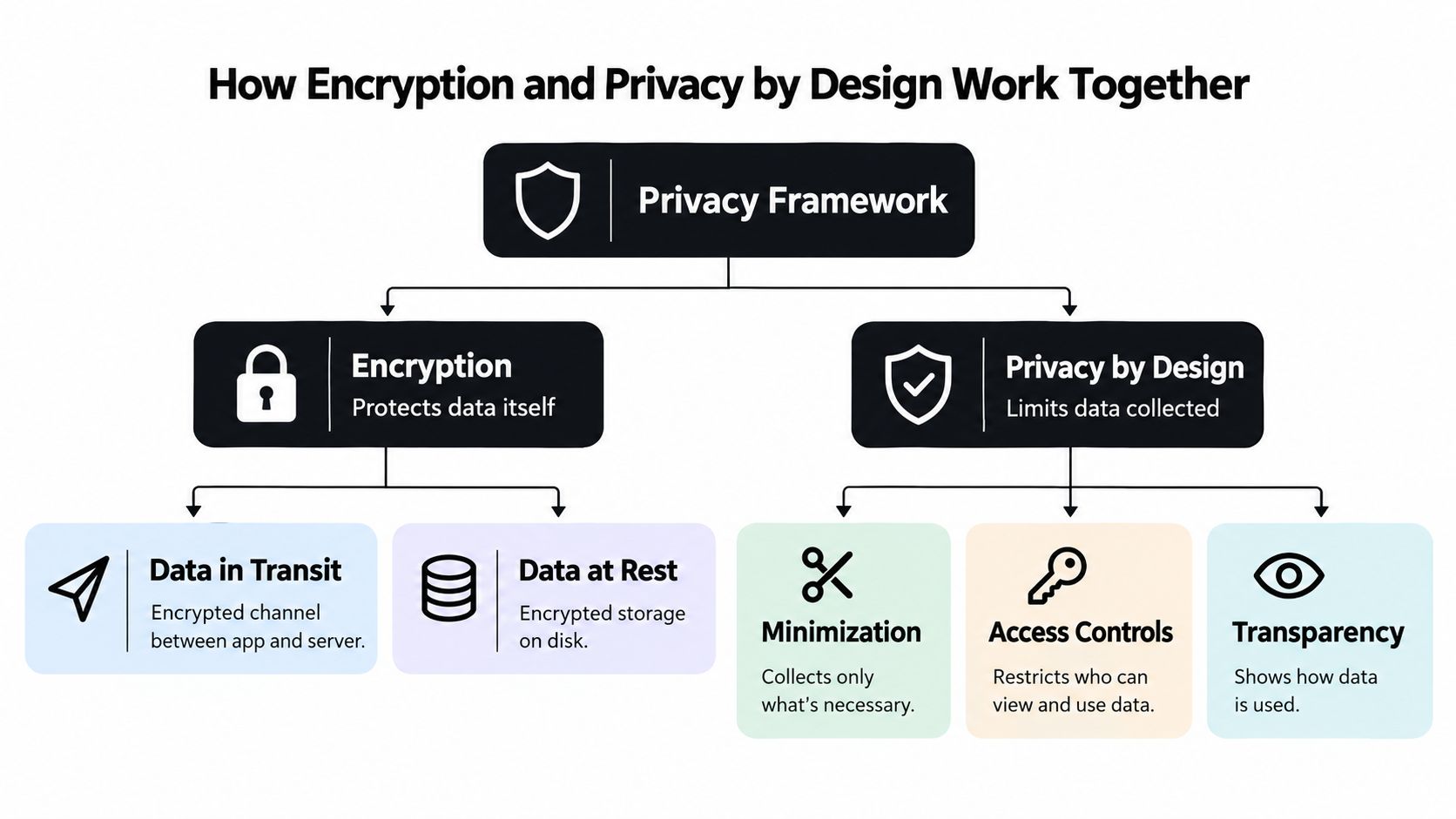
If a budgeting app encrypts every transaction, can you also see what it stores, limit how it uses the data, and delete it when you leave? Encryption protects information from unauthorized reading. Privacy by design determines what the product collects, who can use it, and what happens to the records later. Both controls matter when you move from Mint or YNAB, because a privacy setting is only useful if it supports a right you can exercise.
Your financial data passes through two main states. Encryption in transit protects the connection between your phone and the app's server. HTTPS, SSL, and TLS help prevent someone on the network from reading information as it travels. Encryption at rest protects files, databases, and storage drives after the service receives them.
The Fortra explanation of data in transit and data at rest explains why both states need protection. A secure connection does not protect an exposed database, and encrypted storage does not stop an authorized system from collecting unnecessary details. Access restrictions, monitoring, and clear retention rules complete the control set.
The missing doors in an encryption-only promise
Before importing historical transactions, ask:
- Collection: Does the app need every detail it requests from Mint or YNAB?
- Access: Which staff members, systems, or vendors can process those records?
- Tracking: Do analytics tools observe activity beyond the budgeting workflow?
- Deletion: Can you remove imported data and close the account?
- Transparency: Can you review what the service did with your information?
Privacy by design operationalizes these decisions during development. Data minimization, access rules, transparency controls, encryption, and scheduled deletion are built into the product rather than added to a policy afterward. The privacy-by-design overview from Yiuno provides context for this approach. For a person leaving Mint or YNAB, the practical test is simple: can the provider explain how it handles old exports, failed imports, backups, and deletion requests?
An app can advertise private storage while leaving those questions unanswered. Consumer survey findings discussed earlier show why that distinction matters: people may recognize visible settings without knowing they can inspect or erase collected data. Read the privacy policy for actions, not reassuring labels.
For technical background, how encryption works in Electron apps explains application-level safeguards. You do not need to inspect code. Ask whether the provider protects transmission and storage, restricts internal access, and describes deletion in plain language.
If bills are part of your migration plan, this guide to bill tracking apps can help you compare convenience with privacy. Keep a feature only when its benefit is clear and its data trail is equally clear.
Read-Only Bank Connections and Safe Data Deletion
Bank connectivity is where privacy claims become operational. An app that asks for direct banking credentials creates a different risk than one that uses a secure API and a limited token. The right question isn't merely whether the connection is encrypted. Ask what the connection is allowed to do.
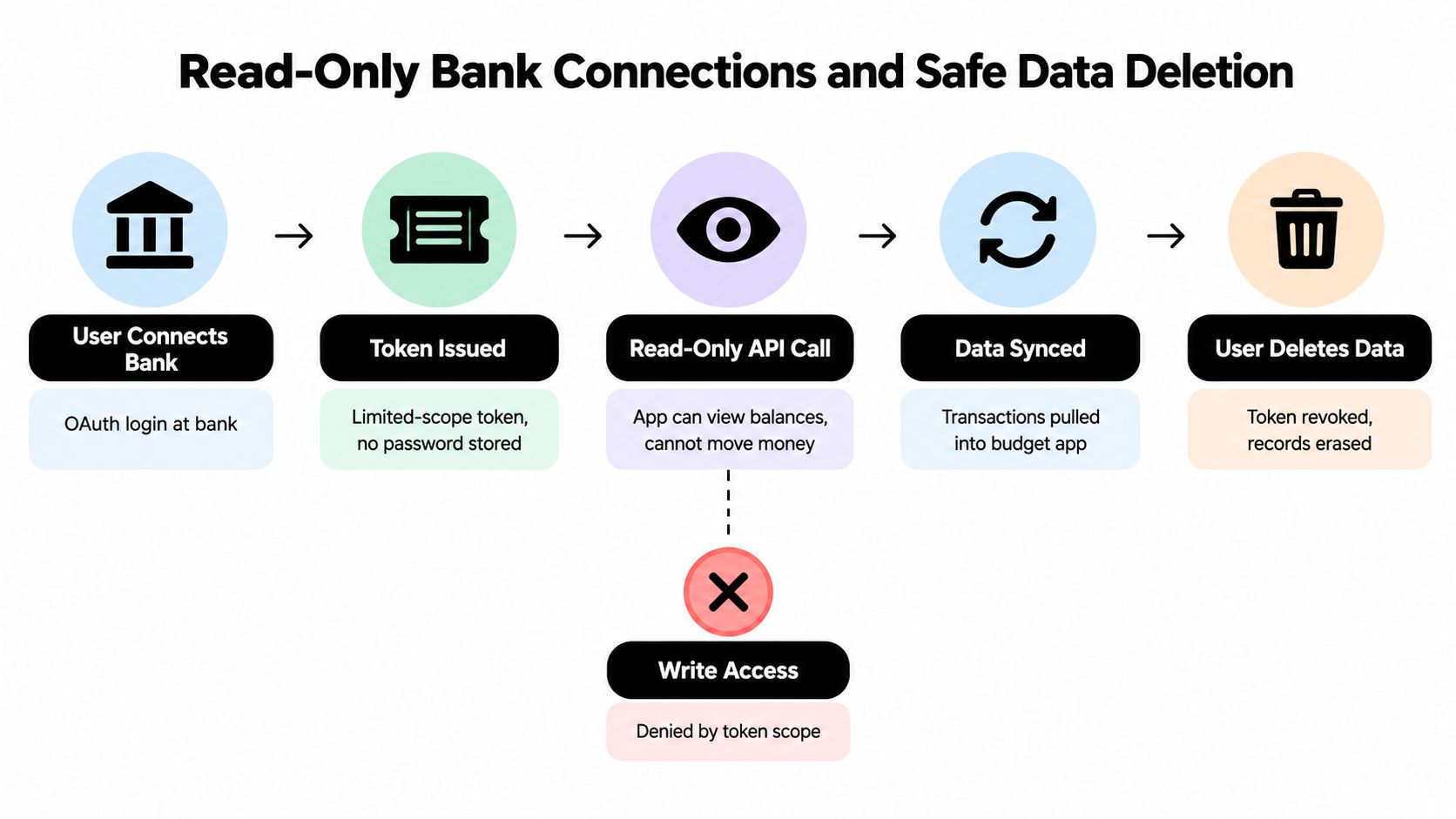
With read-only, tokenized access, the bank issues a limited permission for the budgeting service. The app can retrieve balances and transactions, but the token doesn't authorize it to move money, change account settings, or sign in as you. If the budgeting account is compromised, the attacker has less power than they would have with unrestricted credentials.
The read-only bank access guidance from Zypper also highlights two details users often miss: stored access tokens need protection, and expired data should have a secure deletion process. Token scope reduces the potential blast radius, but it doesn't replace encryption, monitoring, or account controls.
What true deletion should answer
“Delete my account” sounds clear, but a responsible service should explain what that action covers. Ask whether it removes imported transactions, budget records, profile data, bank tokens, email addresses, and linked provider permissions. Also ask whether backups have a separate retention process.
Some systems use crypto-shredding, which makes encrypted data unreadable by destroying the keys needed to decrypt it. Others use key destruction or direct record erasure. These methods can support a strong deletion workflow, but the company should state which records are covered and whether deletion is automatic or handled manually.
Use this short set of questions before connecting an account:
- Connection method: Does the app use a secure API and token, or does it ask for direct bank credentials?
- Permission scope: Can the connection only read balances and transactions?
- Token handling: Are tokens encrypted and revoked when you disconnect?
- Deletion scope: Does the request cover imported financial records and account metadata?
- Confirmation: Will the service confirm when deletion is complete?
When you migrate your bank data, a resource on budget app bank sync can help you think through the practical connection process. For broader guidance on removing information from devices and systems, see how to implement data sanitization controls. The aim isn't to demand a technical certificate from every provider. It's to make sure the provider can describe what happens to your information after you disconnect.
Why Privacy Features Feel Powerful But Often Do Less
A long privacy settings page can create confidence without giving you much control. You may be able to disable personalized notifications, manage cookies, or turn off an analytics preference while still having no clear way to inspect the financial data held in your account.
The survey evidence reflects that disconnect. Deloitte found that 70% of U.S. consumers worry about data privacy and security, but only 20% say technology providers are very clear about what they collect or how they use it, and only 27% have high trust that their data is secure. The same source reports that 86% of consumers globally expect some level of privacy rights from online companies. These figures appear in Deloitte's connectivity and mobile trends research.
Compare the promise with the proof
| What a user may expect | What to verify in practice |
|---|---|
| “Private account” | Whether the app explains collection, access, sharing, and retention |
| “Secure bank link” | Whether the connection is read-only and tokenized |
| “Encrypted data” | Whether protection covers both transmission and storage |
| “Delete your account” | Whether records, tokens, and backups are addressed |
| “No unwanted tracking” | Whether the app uses tracking scripts or shares analytics data |
Multi-factor authentication is useful for protecting account access, but MFA isn't the same as privacy. It helps confirm that the person signing in has another authentication factor. It doesn't tell you what the provider collects after login or whether the company shares usage information.
A data export has a similar limitation. Exporting your budget gives you a copy, but it doesn't prove that the provider deleted its copy. Access and portability answer “Can I get my information?” Deletion answers “Will the provider remove it?” Those are separate rights and separate technical workflows.
Look for evidence, not adjectives. A clear retention period, a documented deletion request, and a description of bank permissions are more useful than a page filled with words such as “trusted” and “protected.”
The practical test is simple. If a provider can't explain a feature without sending you through vague legal language, you can't easily evaluate the protection. More switches don't automatically create more privacy. Clear limits and verifiable outcomes do.
How to Evaluate a Budget App Before Migrating From Mint or YNAB
What should you verify before moving your financial history from Mint or YNAB to another budget app? Treat migration like moving records between financial services. A polished interface may make the process look simple, while the harder questions concern what happens to your data before, during, and after the move.
Start with the bank connection. Read the security or help documentation before creating an account. Confirm that access is read-only, identify the aggregation provider, and check how connection tokens are handled. The provider should state clearly that the app cannot initiate transfers or change your bank settings.
Read the privacy policy for practical answers rather than relying on labels such as “private” or “secure.” Check whether it explains tracking technologies, third-party processors, retention, access requests, deletion, and data portability. During migration, treat encryption, access control, and deletion as three separate boxes to tick. A provider that documents all three is less likely to leave your records stranded than one that advertises encryption alone.
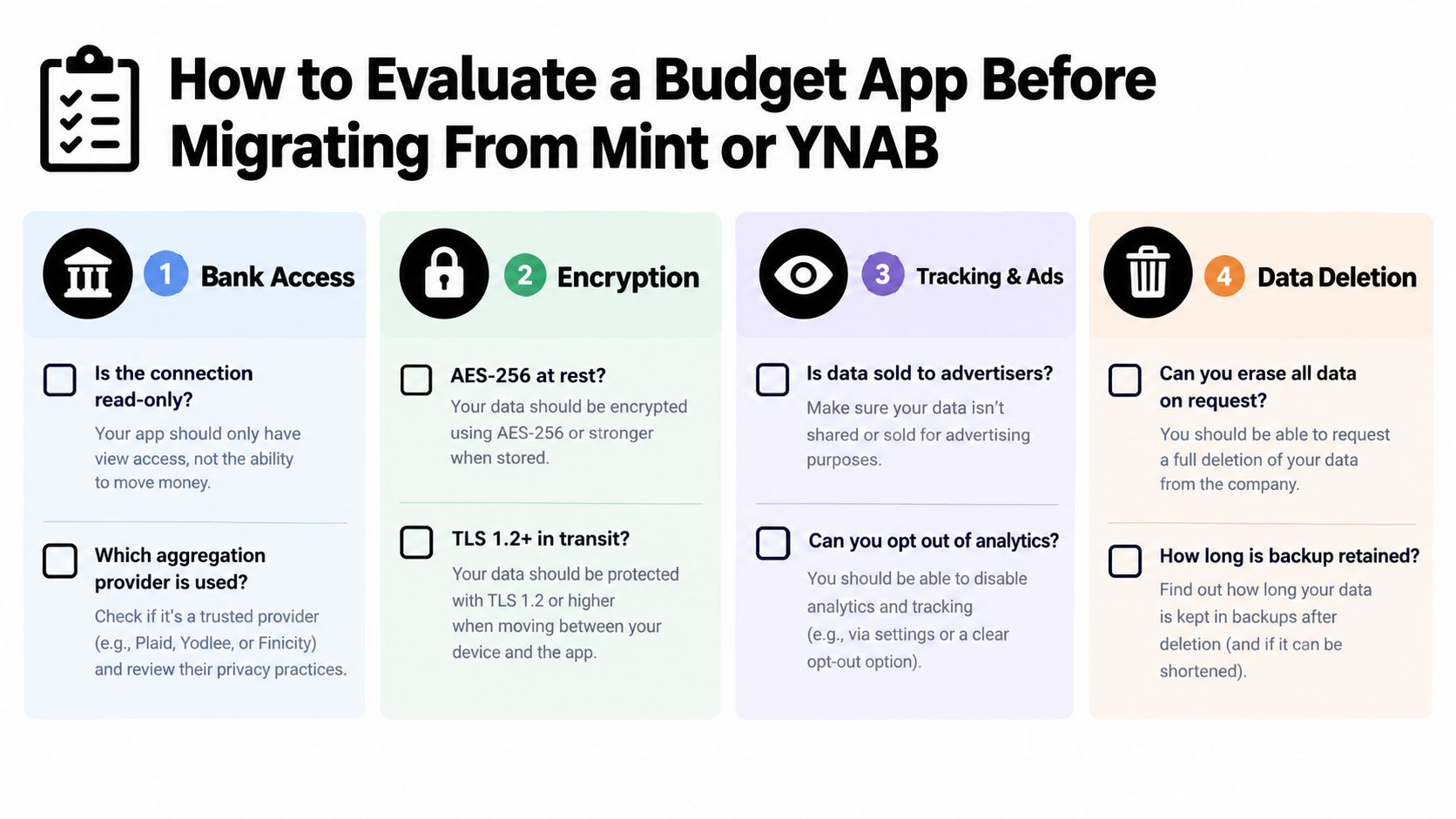
Use a side-by-side migration checklist
Copy these questions into a note and answer them for each candidate:
- Bank access: Is the connection read-only? Which aggregation provider handles it? Does the app store direct bank credentials?
- Encryption: Does the provider explain protection in transit and at rest? Does it identify who can access sensitive records?
- Tracking and advertising: Does the app use tracking scripts? Can you opt out of analytics? Does the policy discuss advertising or data sharing?
- Deletion: Can you request deletion inside the account? Does the process cover imported transactions, tokens, and backups?
- Auditability: Can you review account activity, connection changes, automation events, or email notifications?
- Portability: Can you export your budget and transaction history in a usable format before closing the old account?
Keep Mint or YNAB active after importing your data. Compare balances, recent transactions, category names, recurring items, and historical notes. Store a secure backup of the export, then test the replacement with a limited connection or demo environment when available.
This sequence protects against two forms of lock-in. You retain your financial history while checking the export, and you delay sending bank data to a provider until you understand its deletion terms. Access and portability give you a copy. Deletion determines whether the provider removes its copy. Test both before you close the old account.
Privacy Protection Features Inside Peaceful Mindful Pocket
A zero-based budget can be private without becoming difficult to use. In this example, the app uses read-only bank connections through Stripe, so it can import financial activity without receiving permission to move money. It also uses encryption in transit and at rest, avoids tracking scripts, and supports true data deletion.
The product's workflow focuses on control after the initial connection. Users can review imported transactions, categorize them against planned spending, and use user-written automation rules. Transparent email logs make those automated actions easier to follow, while a time-stamped budget ledger provides a record of activity inside the plan.
Those details illustrate an important distinction. Privacy isn't only about hiding information from outsiders. It's also about giving the account owner a clear view of what the software is doing and a reliable way to stop using it.
You can review the product's privacy policy when comparing its claims with the checklist above. The website and policy are useful for evaluating the implementation, not as a substitute for asking questions about your own needs, bank connection, export, and deletion request.
For someone leaving Mint or YNAB, the relevant comparison is therefore broader than category features. Check whether the new tool lets you create a zero-based plan, connect accounts with limited permissions, understand automated actions, and remove your data when you decide to leave. Those requirements support both financial clarity and personal control.
Final Verification Steps Before You Switch Budget Tools
The common assumption is that a privacy badge or encryption statement settles the question. It doesn't. A provider can protect data during transmission while giving you little clarity about tracking, internal access, retention, or deletion.
Verify each major claim before you migrate:
- Read the connection details. Confirm that the bank link is read-only, tokenized, and unable to move money. If the documentation is unclear, ask support for a direct answer before linking an account.
- Check both encryption states. Look for an explanation of protection in transit and at rest. Don't treat one statement about encrypted communication as proof that stored records receive the same protection.
- Review the privacy policy slowly. Find the sections covering data collection, analytics, third parties, retention, access requests, and deletion. Save a copy of the policy you reviewed so you can compare future changes.
- Test the account controls. Review login alerts, connection history, activity records, and automation logs. Disable anything you don't need.
- Request deletion information. Ask what gets erased, how tokens are revoked, whether backups are covered, and how the provider confirms completion. A clear answer should distinguish immediate deletion from any limited retention.
- Validate your export. Export the existing budget before closing the old service. Open the file, inspect categories and transactions, and keep a secure backup.
- Run a small migration first. Compare the new app's imported balances and transaction history before relying on it for the entire household budget.
Your final test is comprehension. If you can't explain what the app collects, what the bank connection can do, and how deletion works, you haven't finished evaluating it.
Strong privacy protection features are measurable. They protect information while it travels and rests, restrict what connected services can do, reduce unnecessary tracking, and give you a real path to deletion. When you're moving sensitive financial plans from Mint, YNAB, or another tool, verify those controls before convenience turns into lock-in.
Peaceful Mindful Pocket LLC offers a zero-based budgeting app with read-only bank connections, transaction imports, privacy-focused controls, and guided support for building a spending plan. Visit Peaceful Mindful Pocket LLC to review the budgeting workflow and decide whether it fits your migration and privacy checklist.